Image of frost shattered stones by CookandKaye website design.

Permalink to Red letter day. Red letter day

October 28th, 2009

We’ve been working with Mobility Nationwide for a couple of years now, taking on the day to day maintenance following the untimely death of their web developer. Over the last year we’ve been brought the site up to the latest HTML standards – important in ensuring accessibility (not to be neglected for older web users, which is the case with many of Mobility Nationwide’s clients), but most recently we looked at updating the banner to improve its visibility to search engines.

Well, looks like the work has paid off, with the site now hitting the #1 place on Google, so:

See Mobility Nationwide, for your wheelchair accessible vehicle!

Permalink to COSHH online. COSHH online

October 28th, 2009

Over the summer we have been busy developing a system for managing COSHH information for the Department of Chemistry at the University of Sheffield. This has been a particularly interesting and complex project. The requirement was to permit students and research workers at the department to prepare and submit proposals for working with chemicals, as required under UK/EC COSHH legislation.

To help ensure the system was easy to use, it was coded to allow access for the administrative staff from very early in the developmental process. As a result the client was able to provide feedback into the design and implementation at every important stage:

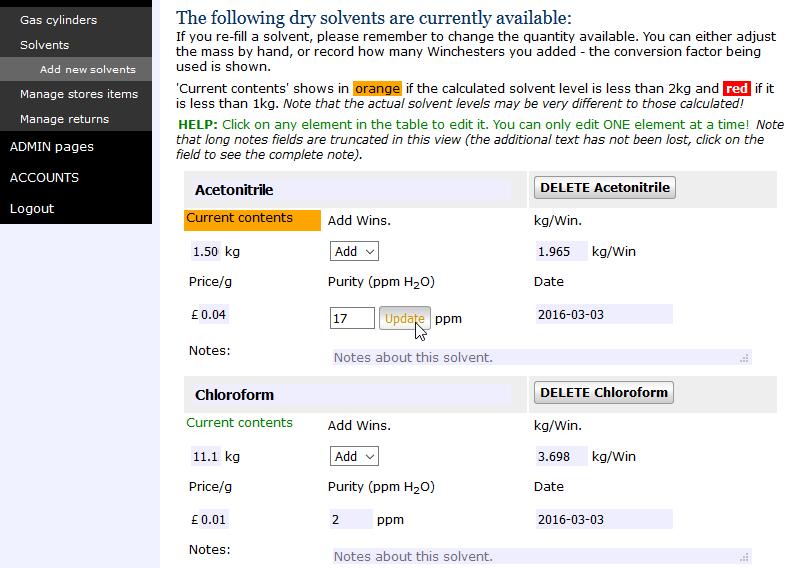
The COSHH form interface the information going into a COSHH form is exceptionally complex, covering the nature of the procedure, the chemicals involved, hazards and proposed mitigation. To be intelligible, however, the user needs to see the entire form at a glance. To do this a master form was built, that displayed key data, and this linked to total of nearly 20 sub-forms where the user could change parameters whilst being able to view existing selections in the master form.

COSHH form example

Above: Screenshot of the COSHH form, with a sub-form inset showing radio-buttons allowing the user to select the type of containment required for their procedure.

The chemical search interface building a simple and useful chemical search interface is a problem of itself. Users must be able to find the chemicals they are proposing to use, and this must be linked with the relevant health and safety information so that they can prepare an informed safety assessment. We developed a system based on chemical names and CAS numbers (the latter to help prevent duplication of chemicals on the database). Chemical searches can be performed by CAS number, name, name fragments or names starting with. In addition, at the request of the client we extended this to show a ‘most likely’ selection of chemicals at the top of any search results. The latter was important as there are many chemicals starting sodium – and if you are searching for sodium itself you don’t want to browse through all of them to find it!

The user interface was secured by IP address and login, as it is neccesary to identify users uniquely. Several levels of user were included, from clerical staff (with look up privileges to permit them to check that any chemical ordered had been subject to a COSHH assessment) to administrators, who had final say as to whether or not the assessment was acceptable on behalf of the department.

Completed COSHH assessments for each user were listed in their home section of the site. Additionally, each user could see assessments prepared by members of their group, or search for any assessment on the system by chemical or assessment number. This greatly simplifies the process of preparing a COSHH form, as existing forms can be imported to the user’s work-space and used as the basis for their own work. A simple security feature enables users to hide chemical information if required.

Safe working in an emergency it is important to be able to get access to COSHH information, so a brief output providing the salient safety information is available publically (protected by IP address) so rescue staff within the department can access the required information without having to login to the system.

Integration with existing information chemical and user data were imported from the existing system, and cleaned before insertion into the new web-based interface. Cleaning included checks for valid CAS registry numbers and valid user email accounts.

The administration interface is easy to forget given all of the rest going on – for a system of this complexity, however, the admin interface must be competent. The one we developed is capable of managing users, chemicals and COSHH information, as well as keeping tabs on how old the information is, and whether or not it is due for review!

With so much going on in the system, it was a great relief to find that users had few problems getting to grips with it. “The new users have had no complaints and the users who were familiar with the old system have had nothing but good things to say about the new one.” (Elaine Frary, COSHH administrator, University of Sheffield Department of Chemistry).

Permalink to Front-page news. Front-page news

August 18th, 2009

Image

The Polymer Centre website uses a WordPress news management system, but conventional HTML pages for the bulk of the site. This combines layout flexibility where it is needed, in the home page, for example, with easy updates. However, these updates are only seen when you visit the news section (run by WordPress) – what was needed was a means to get headlines from the news section onto the home page for the site, where every visitor could see them.

To do this we built a small program that grabs data from the WordPress database, and re-formats it for a text display on the home page. As the Polymer Centre website has a very well defined design, however, we were able to take this a step further. In this we take the headline and a snippet from the text, but also derive a thumbnail of any image accompanying the story. These elements are then fed into a Flash program that displays the last five stories one after another, with short transitions between each.

For those without the (nearly ubiquitous) Flash plugin an alternative text and link description is made available (using Flash satay, described previously), ensuring a high degree of accessibility.

Please visit the Polymer Centre to see how their polymer news system works.

Permalink to Mobility Vehicles Ireland launched!. Mobility Vehicles Ireland launched!

July 17th, 2009

Home page of the Mobility Vehicles Ireland website.

We’re just in the process of launching a new website for Mobility Vehicles Ireland; this cross Irish Sea venture brings together one of the leaders in supplying wheelchair accessible vehicles in the UK with an established Irish partner with many years experience customising commercial vehicles. The partnership will make a lot more wheelchair accessible vehicles available to people in Ireland – at competitive prices. To give an idea of the size of the venture, Mobility Vehicles Ireland currently offers a selection of nearly 30 wheelchair accessible vehicles.

It has been quite an interesting experience developing a site for the Irish market. We have found a couple of technical hurdles to overcome, one of which has been a very slow update of the Irish domain name servers. This makes for problems with domain management, as any maintenance or movement of the domain may cause many weeks of disruption to web services. In fairness, it is not clear whether or not the problem here is Ireland wide, or just restricted to Eircom. If the latter, the issues of near monopoly suppliers not being terribly agile is common accross the globe!

Anyway, we hope we are now past our teething problems, and wish JJ and Dave all the very best in this new venture, please visit their new site at:
Mobility Vehicles Ireland – quality used wheelchair accessible vehicles!

Permalink to An anatomy of spam. An anatomy of spam

July 13th, 2009

Spam is one of the really irritating things about modern life, but like its namesake, there is not usually a definable anatomy, never mind an easily identified origin! In this study, however, we get a sneak peak at what drives a spam…

For a number of years we have employed email forms on our websites to combat the worst excesses of spam. This simple system hides our email addresses from being harvested, and allows us both to follow up new enquiries, and to re-direct email easily dependent on who is available to answer it. What it prevents is our addresses being parcelled up and flogged mercilessly by spam robots!

Recently, however, we started getting very similar emails arriving in our in-box, all with random subject lines, and containing 20-30 links to pages within a domain, with a small added random component to each address*. A quick look round the web showed us that the web addresses often appeared in web-blog comments posts. Comments on blogs are intended to permit interested readers to feedback into a story, but have long been used as a means for the unscrupulous to advertise a load of web addresses. These addresses will usually be providing services that cannot be advertised more conventionally because they are illegal, immoral, or offer downloads that might damage or enslave your computer. This is spam; it exists is because there are some things that you simply cannot mount an ad campaign for, after all, it really isn’t that difficult or expensive to get a site noticed, so anyone using this technique for a legitimate product would be just too dumb to breath!

A quick bit of modification to our email form allowed us to pick up the IP address of the robot(s) sending the junk, and this was identified as 83.233.30.159, which appears to be a Swedish IP, advertising a site in the Netherlands (I don’t see any reason to advertise them here! Thanks to ip-lookup for tracing the IP information). Clearly one of the more stupid spam machines had picked up on our contact form, and every two hours was posting us a new set of 20-30 links, without realising that there was no blog behind the form for their advertising to have any effect on…

Hey-ho, at present this is only a minor annoyance, and has even provided some interest in that the activity is regular, and possesses a degree of anatomy that is subject to some analysis. As ever, however, we have to be alert to how efficiently we might block this kind of activity if it were to get more significant.

An obvious contender would be to block the IP address, which has remained constant for the last few days, this can be coupled to an apology and opportunity to contact through snail mail or phone if the IP address later passes on to a genuine person. Alternatively, the industry standard approach has been to deploy Captcha, which asks anyone submitting the form to type in a set of letters and numbers from an image that is doctored to make it difficult for a machine to read it.

Both systems have their advantages and disadvantages: Unfortunately a lot of early Captcha systems have now been broken; on the other hand, IP addresses are pretty easy to spoof or change…

As a final comment, on the mutability of IP addresses, it is quite interesting to probe an access log and watch a more sophisticated hacker ‘at work’. This is characterised by a number of related probes coming in, but with the IP address jumping over a broad range of values. This kind of thing can force you to get quite brutal with IP blocking – but more on that some other time!

*The random components to subject lines and addresses make it more difficult for spam assassin programs to pick out these bad emails.

Permalink to Caring about standards. Caring about standards

June 25th, 2009

The internet is no longer dominated by Microsoft’s Explorer browser, and this makes life more difficult for the both web designers and owners – no longer can you simply design a page that looks OK in Explorer and call that a website! Instead designers have to work to internationally agreed web standards – and this is no bad thing…

We have recently updated the Mobility Nationwide website to match W3C guidelines. This process helps ensure that the site displays properly across a wide range of modern browsers – from PC’s to iPhones!

As importantly, the process provides an MOT for your website. As a small family company that supplies wheelchair accessible vehicles, the ability to demonstrate that they care about standards is an important part of their brand image.

Mobility Nationwide website

Permalink to Animated icon evaluation. Animated icon evaluation

June 15th, 2009

Web icons (‘favicons’) offer a simple graphical reminder for bookmarks, and have become very popular since they were introduced with IE 5. Most recently FireFox has introduced support for animated icons in .gif and .png formats. Currently these are only visible to people running FireFox, so we’ve taken a poke under the bonnet to check code that promises to offer a static icon as an alternative for visitors who don’t use this browser.

Our full review is available through the link below:

Testing animated favicons

Permalink to CAS number validation with PHP. CAS number validation with PHP

June 3rd, 2009

Chemical names tend to be a mixture of IUPAC and lab-speak, and an empirical formula can represent a dozen very different substances. So, when it is important that you report chemicals accurately – how do you do it? This is a problem we have recently encountered in developing an interactive database for the ‘Control of Substances Hazardous to Health’ (COSHH) for a University department. Here the system must be able to unambiguously associate chemical substances with risk and safety data.

Pretty much the only way to do this is through the CAS registry number, this is issued to all reported chemicals by the Americal Chemical Society. The chemicals themeselves will be called up by users by their IUPAC name or any synonym that is available in the database, or by fragments of these, making it easier and quicker to use, though the option of using the CAS registry number will also be available to them.

The CAS number has the format 1234567-12-1, i.e. a number up to seven digits long – a two digit number – a single digit number. The last number acts as a check for the whole number, to help prevent typo’s, so this system is quite robust, and allows us to add new chemicals to the existing database without great fear of duplication (in fact some chemicals have been associated with more than one CAS number, so even this is not infallible).

All we need now is a check program for the CAS number, to help ensure the user or administrator does not make typos. This we adapted from the code posted by Rich Apodaca on Depth First (in Ruby):


function valid_cas($cas_no) {
$pattern=false;
$sum=false;
$checksum=0;
//pattern check
if(ereg('[0-9]{2,7}-[0-9]{2}-[0-9]', $cas_no)){
$pattern=true;
}
//perform check sum
$cas_no=strrev($cas_no);//reverse the string
$cas_no=str_replace('-','',$cas_no);//take out hyphens
$chk_digit=substr($cas_no, 0, 1);//get the check digit, now the first number!
for($i=0; $i<strlen($cas_no); $i++){
$digit[$i]=substr($cas_no, $i, 1);
$checksum=$checksum+($digit[$i]*$i);
}
if($chk_digit==$checksum%10){
$sum=true;
}
if(($pattern)AND($sum)){
return true;
} else {
return false;
}
}

Calling valid_cas(number-to-test) within a PHP code block will return true or false, depending upon whether or not the CAS number has a valid format, so providing a valuable chack against typos on adding new chemicals to the database, and permitting the database to check against duplication.

For more on the CAS registry number – see the wikipedia entry

Permalink to ScapaMAP. ScapaMAP

March 31st, 2009

We’re currently working on a new website for ScapaMAP, documenting the remaining wrecks of the German High Seas Fleet scuttled at Scapa Flow at the end of the First World War. The latest additions to the site are 3D files for each of the warships still in the Flow. These are based on the acoustic surveys carried out by the ScapaMAP project.

The 3D models were created in Fledermaus by the project team. This format does not run as a browser plugin, so we can only offer them as downloads, though there is a free player. In an effort to make the survey work more approachable to all visitors, we’ve been looking at creating some simple 3D environments in Flash to compliment these.

One of these is the 3D image of the light cruiser SMS Köln, shown above. This is based on the contour data from the multibeam survey, which is sliced into a series of layers depending upon their relative depths. Each layer moves independently, controlled by your mouse position over the model. Your mouse position acts as a viewpoint for this simple model, which still shows clearly how the hull encloses a mass of salvage debris, where salvors have broken into the engine room, to remove the condensers and other fittings that were made out of copper alloys.

With only a limited range of viewing angles, the model of the Köln, (above) is not nearly as impressive as the Fledermaus 3D model, but at the same time it will run on most people’s browsers without problem…

Visit the ScapaMAP website for more information:

ScapaMAP – archaeology of the WW1 German High Seas Fleet

Permalink to Polymer Centre research map. Polymer Centre research map

February 4th, 2009

The new Polymer Centre research map has been built on an existing staff CMS that stores keywords and a précis of information about staff research interests. To create the map the keywords were first grouped into superordinate terms – for example the keywords ‘Rheology’ and ‘Optical properties’ falls under the generic class of ‘Polymer Analysis’ (or just Analysis).

To make the system as flexible as possible, the link between keywords and superordinate terms is done through a ‘plug board’ programming interface. In this, each keyword is assigned to a number of generic categories through selecting check boxes – easy!

The results are stored in a MySQL database, and this is used to power the research map itself. On first sight the map provides a coarse list of the superordinate terms – polymer analysis, characterisation and so on. On selecting one of these terms the list expands to show the relevant keywords. The keywords can in turn be expanded to display the names of research staff engaged in the work of interest.

The system therefore offers a simple visitor interface that can be quickly and intuitively navigated to find the information of interest. It offers a great advantage over an empty search box on one vital respect – it always offers the visitor a positive result! Not all sites have Google-like resources, and using a controlled language of keywords in this way allows us to guide a visitor to what we have, rather than their getting lots of failed searches.

While the research map offers visitors a neat tool for finding the information they want, it is also an engine to help ensure that search engines can tie our keywords to content on the Polymer Centre website. To do this, the meta content on each of the staff pages contains the same keywords they are associated with in the database.

In addition, however, the meta content of the research map itself is served dynamically. The page title, description and keywords are updated to reflect the level of the map that is being examined. Thus if you have opened a keyword, that keyword and the associated staff appear in the appropriate meta content sections of the research map page. As these sections are important to search engines in ascertaining the important content of a page, this design helps to ensure that the information the Polymer Centre carries about polymer research and near market activity is readily available on the world wide web.

- If you are interested in Polymer Research, why not try it out!

The Polymer Centre Research Map